Understanding Visuals
This page explains every mark on a region map (grid squares, repeater chips, lines and the details panel), roughly in the order of the Legend card in the bottom-right corner.
Colours on this page are the Default palette
MeshMapper also has four colour vision palettes (Protanopia, Deuteranopia, Tritanopia and Achromatopsia) under Settings > Accessibility > Colour Vision, and each one remaps these colours. Backbone gold, for example, becomes white in all four. See the colour vision options. Where a mark also has a distinctive shape or position, this page says so.
The Grid System
The map is divided into grid squares: 300 m in Simplified mode and 100 m in Detailed mode (change it with Grid Mode in Settings). In Detailed mode each ping fills a 3×3 block of squares around where it was sent.
A square can hold many pings, so it shows the best result it has, in this order:
| Priority | Colour | Type |
|---|---|---|
| 1 (Highest) | Green | BIDIR |
| 2 | Cyan | DISC / TRACE |
| 3 | Orange | TX |
| 4 | Purple | RX |
| 5 | Grey | DEAD |
| 6 (Lowest) | Red | DROP |
Example: A square with 10 red pings and 1 green ping shows green, because coverage is possible there.
Clicking a square highlights it and dims the rest of the coverage. The other coverage modes (Effective Coverage, Signal Strength, Ping Age, Noise Floor) colour squares differently and each has its own legend.
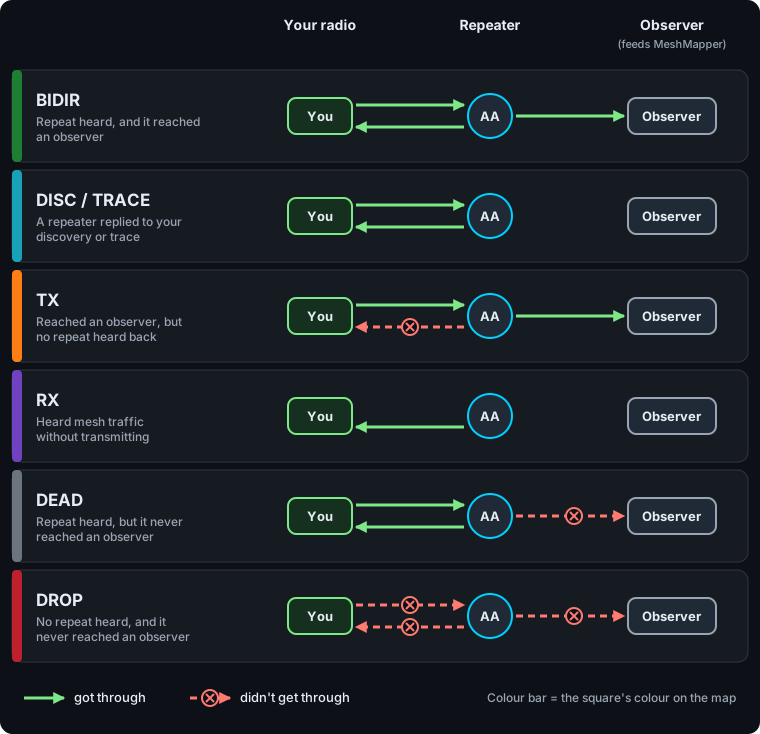
Ping Types Defined
What decides a ping's type is whether your radio heard a repeat, and whether the ping reached MeshMapper's observers.
- BIDIR - Green
- Heard repeats from the mesh and successfully routed through it. A solid two-way link.
- DISC - Cyan
- Your radio sent a discovery request and heard a repeater reply.
- TRACE - Cyan
- Your radio sent a trace and heard the reply. Shown the same as DISC on the map.
- TX - Orange
- Successfully routed through the mesh, but your radio heard no repeats back. Often a sign you can reach the mesh but can't hear it well.
- RX - Purple
- Your radio heard mesh traffic but didn't transmit. Useful for mapping where the mesh can be heard.
- DEAD - Grey
- A repeater heard it, but no other radio received the repeat. Often a repeater that isn't well connected to the wider mesh.
- DROP - Red
- No repeats heard and no successful route. A likely dead zone.
Repeaters
Chip Anatomy
A repeater is drawn as a small dark chip carrying its hex ID (at the width it advertises, 1–3 bytes):
- The body is always dark slate, in every state and palette.
- The state is shown by a thick bar down the left edge and the chip's border.
- The ID is always white.
Scan for the edge colour.
Repeater States
| State | Edge Colour | Meaning |
|---|---|---|
| Active | Green | Heard from recently. The ordinary state. |
| New | Pink | First seen in the last 14 days. Drawn slightly larger, with a glow. |
| Stale | Grey | No advert within the region's window (24 hours unless the admin changed it). |
| Ambiguous | Red | Its ID matches another repeater's at the width it advertises, so pings can't be credited to it with certainty. See Duplicate Repeater IDs. |
| Backbone site | Gold | One of the repeaters carrying the most traffic. See The Backbone. |
If more than one applies, Ambiguous wins over Stale, which wins over New. So a new repeater that has gone quiet shows grey, not pink. Gold only replaces Active.
Observers
An observer is a repeater that also feeds packets to MeshMapper. Its chip has an eye (👁) in front of the ID. The eye isn't a state, so an observer can be in any of the states above.
Groups
In Simplified mode, repeaters too close together to draw apart collapse into a round badge:
- The number is how many repeaters are in it (e.g.
1.4kpast 1000). - The ring is the colour of the most common state in the group.
- The dots underneath show which states are present, one dot per state. They don't show how many.
Click a badge to fan the repeaters out. Large groups (more than 18) zoom in instead when you're zoomed well out.
Badges aren't used in Detailed mode, or while Repeater Neighbours, Repeater Scopes, Backbone or Visualize Live is on.
Links Between Repeaters
The Repeater Neighbours overlay draws lines between repeaters known to reach each other. All are solid, so the colour tells them apart.
| Line Colour | Kind | Meaning |
|---|---|---|
| Green | Inferred, fresh | Seen next to each other in a packet path an observer heard, in the last 3 days. |
| Orange | Inferred, older | The same, but older than 3 days. Hidden after 7 days (unless the admin changed it). |
| Blue | Reported | The repeater reported the other as a neighbour when an observer asked. Kept 30 days by default. |
| Purple | Uploaded | A wardriver's app collected the repeater's neighbour table and uploaded it. Kept until replaced. |
If a pair has a Reported or Uploaded link, the inferred line for that pair isn't drawn.
The Repeater Scopes overlay uses the same blue and purple, but shows inferred links in grey. See Repeater Scopes.
Orange means two different things
An orange square is a TX ping. An orange line is an older inferred neighbour link.
The Backbone
The Backbone overlay shows the repeaters the region leans on most: the smallest set whose links carry half of the region's traffic. For how it's calculated, see Backbone.
- Percentages: each backbone chip shows its own share of the region's traffic (e.g.
A1B2 7.4%). The shares add up to about half; they aren't slices of one number. Chips show their share even with the overlay off. - Gold doesn't mean healthy: gold only replaces Active. A backbone repeater that's New, Stale or Ambiguous keeps that colour, so not every backbone site is gold.
- Trunks: lines between backbone sites. Each site keeps its three busiest links. The colour is the trunk's rank, busiest (red) to quietest (pale yellow), not an amount of traffic. Line width means nothing.
- Turning it on shows only backbone repeaters, turns Repeaters on, and turns Repeater Neighbours and Repeater Scopes off.
- On a group map, the whole group is scored as one pool, so a small member region may have two backbone sites or none.
Signal (SNR)
Wherever the map colours something by signal quality, it uses three bands:
| Band | Colour | Quality |
|---|---|---|
| Over 5 dB | Green | Strong |
| -1 to 5 dB | Dark Yellow | Moderate |
| Under -1 dB | Red | Weak |
If the signal can't be read, it's shown in grey.
Ping Details
Click a grid square to see its pings. By default details open in the Sidebar; you can switch to Popup under Info Panel in Settings.
Summary
When a square has more than one ping, you see a summary first: Total Pings, a count for each type, the average signal (AVG SNR), the furthest distance to a repeater (MAX DIST) and the average noise floor (AVG NOISE).
- Sidebar: below the summary is a Ping History list, newest first. Click a card to see that ping.
- Popup: use the < and > buttons to step through pings, newest first.
A Single Ping
- Type, time and who sent it (unless the region hides names).
- Power, and whether an external antenna was used.
- Radio preset (frequency / bandwidth / SF / CR).
- Heard Repeats: every repeater your radio heard repeat the ping, strongest signal first. For DISC and TRACE this shows the repeater that replied, with local and remote signal.
- Via: the repeaters that carried the ping to MeshMapper's observers.
- A repeater shown as (AMBIGUOUS) lists its possible Candidates. One shown as (hidden) is a private repeater.
- Ghost means the ping named a repeater that has never been registered on this map. Gone means a repeater that was placed before can no longer be matched (for example, it has moved).
- The link icon copies a direct link to that ping.
Lines on the Map
While a ping is selected, lines show how it connected:
- Solid coloured line: a repeater your radio heard, coloured by signal.
- Dark blue line: the Via route the ping took.
- Red line labelled Duplicate: a possible repeater when the ID is ambiguous.
Repeater Details
Click a repeater chip to see its details. The rest of the coverage dims so its own coverage stands out (see Repeater Coverage in Overlays).
- Status: Repeater Online, Backbone Site, New Repeater, Stale Repeater, Ambiguous (with the other repeaters sharing its ID), Inactive or Disabled.
- Clock warning: "Repeater time is not set correctly" if its clock was more than 120 seconds off when last checked in the past week.
- Details: ID and advertised ID width (Advert Bytes), power, First Heard, Last Heard, Max Range, and any hardware, antenna, height, power source and site notes the admins have added.
- Freq: the radio presets it has been heard on.
- Mesh Scopes: the scopes it carries. See Repeater Scopes.
- Traffic rank: where it ranks for traffic in the region, and its share.
- Stats: ping counts by type and a signal-vs-distance chart.
- Neighbours: repeaters it links to, marked I (inferred), R (reported) or U (uploaded), with direction, signal each way, packet count and last seen. Click one to draw that link.
- Recent Adverts (sidebar): its adverts from the last 7 days.
- Add Another (sidebar): compare several repeaters' coverage side by side.
- The link icon copies a direct link to the repeater.
Private Repeaters
Repeaters whose name starts or ends with 🚫 are hidden from the map. See Private Repeaters.